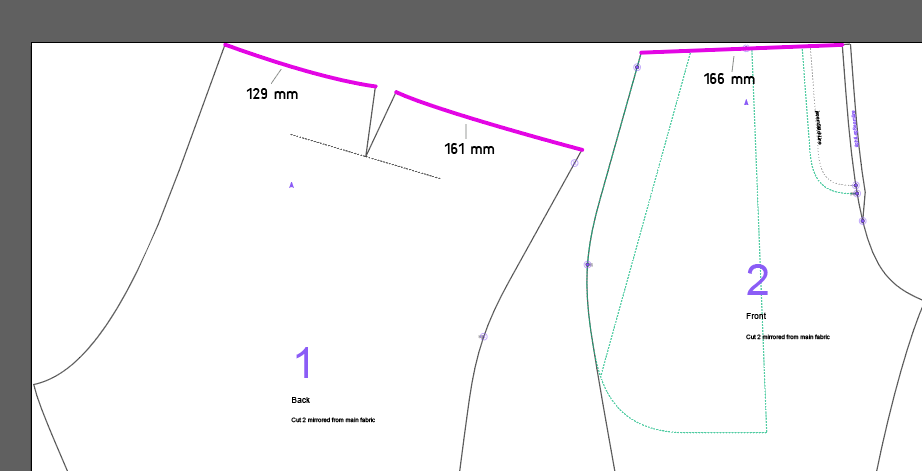
i sewed the charlie pattern with my measurements and the waist turned out way to loose and i had to reduce it by around 6 cm. I measured the pattern in InDesign and the waist circumference was also around 6 cm larger than what i had provided as measurement, so i didnt make any mistake while sewing.
For experimentation i also created the pattern for the public Ghislain measurement set and measured again in InDesign and the waist was only a few millimeters larger than the waist measurement given to the software.
So there must be something wrong with my measurements that makes the pattern generator add too much length to the waist related parts. Can anyone give me a hint what that might be? I attached the measurements i used below.
charlie is designed to have the waistband sit somewhere in the lower half of the area between hips and waist. The length of the waistband needs to be longer than your waist measurement (waist is defined as your narrowest circumference along the torso). titan (which charlie is based on) does not use a hips measurement, so instead, we kind of interpolate between the seat circumference and the waist circumference.
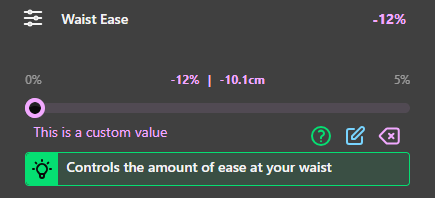
It seems like in your case, this approximation isn’t working all that well. (Ghislain’s circumference delta is much smaller than yours.) You may get a better result by lowering the ‘waist ease’ value, even making it negative. (The slider won’t allow it, but there’s an edit button and then it works.)
I played with waist ease and was able to generate a pattern that had an appropriate circumference in the waistband. I will try to make it in the next weeks. This has solved my problem with the pattern, thank you very much @anna_puk.
Just out of curiosity, do you know why the hip circumference is not taken into account when calculating the appropriate circumference for the waistband?
Because the design is based on Titan, our trouser block which fits the waist and seat.
It is almost always better to draft a smooth curve from waist to seat, than to risk overfitting by trying to hit every individual measurement.
When the Titan block is developed into a relatively low-waisted design as charlie, this logic becomes a lot less obvious, and not fitting the waist seems like an oversight.
In practice, fitting the waist would be tricky to accomplish. Especially because charlie gives you plenty of leeway to change the waist height.
Thank you both for your help; I got around to trying out your tips.
I generated a new pattern with negative waist ease and it fit a lot better.
However, I noticed that there isn’t a direct influence of the waist ease on the waist circumference of the pattern.
For example, when I generate a pattern with 0% waist ease and with -12% waist ease, the tool tells me the waist ease will be -10.1 cm (as opposed to 0 cm change with the 0% waist ease pattern); however, when I measure it on the pattern, the waist circumference is reduced by ~5 cm.
Is this once again due to the algorithm prioritizing other things to get a pattern that honors all measurements?
Is there a better way to get something with the absolute waist diameter I want without moving back and forth between FreeSewing to generate and Adobe Illustrator to measure the pattern?
If you enable ‘paperless’, you’ll get several dimensions shown in the pattern view, plus a grid that you can use to estimate any others.
What you’re measuring on the pattern isn’t the waist circumference, because the waistband sits somewhere between waist and hips. The ease we’re calculating is for a hypothetical extension all the way up to the waist, which is defined as the part of your torso with the smallest circumference.
You may find it easier to look at the waistband length instead. If you enable the ‘this design can save space and trees’ option, the message will show you how long to make the waistband.